Azure Cloud : Day 02 - Azure Resource Hierarchy
Azure Tenant
Tenant is the top-level entity in the Azure resource hierarchy. It represents your organization’s identity boundary and is managed through Microsoft Entra ID. It is a dedicated instance of identity and access management for your organization. It Contains
- Users
- Groups
- Applications
- Service principals
- Authentication policies
Tenants are setup like One organization = one tenant (usually), for example:
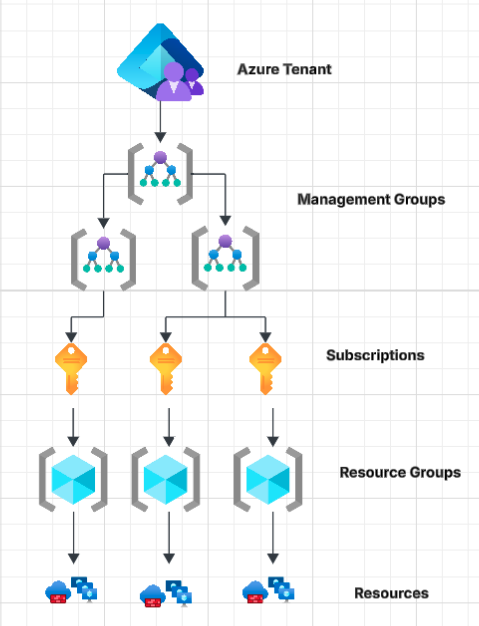
Management Groups
Management Groups are used to organise and manage multiple subscriptions at scale. It is a logical container above subscriptions that helps you apply governance (policies, access control) across multiple subscriptions. Example of Management groups
Subscriptions
Subscription is a logical container used to manage and bill for cloud resources. Everything you create (VMs, storage, databases) must exist inside a subscription. Some of the key functions of subscriptions:
- Costs are tracked per subscription.
- Each subscription has its own billing account
- You can assign roles (Owner, Contributor, Reader) at subscription level.
- One subscription belongs to one tenant, you can’t associate one subscription to multiple tenants, but you can move subscription between multiple tenants.
Resource Groups
Resource Group is a container that holds and organise Azure resources like VMs, storage, databases, and networking components.
Tags
Tags are key-value pairs used to organise, categorise, and manage resources. Tags can be applied to resources (vm, storage, DB), resource groups, subscription. Example of azure tags:
Environment : Production
Owner       : Ajay
Project     : E-Commerce
Tag Inheritance : Tags do not automatically inherit from Resource Group to resources. You must apply manually or use Azure Policy to enforce.
Resource Locks
Resource Locks are used to protect resources from accidental deletion or modification, even if users have high-level permissions. Locks can be applied at subscription level, resource group level and individual resource level.
Types of Resource Locks:
- Delete Lock (can’t delete the resource, only view and modify)
- ReadOnly Lock (can’t delete and modify, view only)