Azure Cloud : Day 03 - Azure Identity Architecture
Azure identity architecture consists of Microsoft Entra ID tenants that contain users, groups, and applications. Applications are represented by service principals (enterprise applications) which are used to authenticate and access Azure resources using RBAC. Groups simplify permission management, and the tenant acts as the identity boundary for the organization.
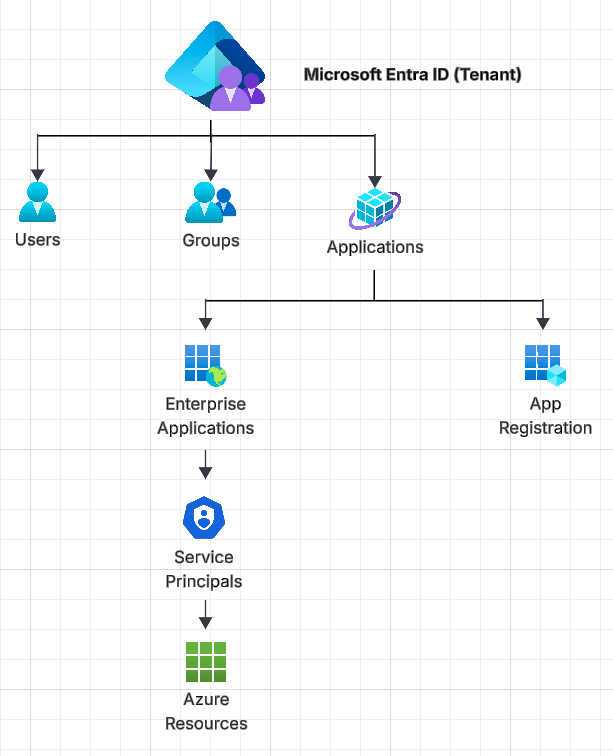
Microsoft Entra ID
Microsoft Entra ID is a cloud-based identity and access management service that handles authentication and authorization for users and applications in Azure and other cloud services.
- Identity provider (Like GCP IAM + Cloud Identity)
- Manages:
- Authentication (who you are)
- Authorization (what you can access)
Tenant (Directory)
- A tenant is A dedicated instance of Entra ID, and represents an organization.
- Each tenant has Unique domain.
- Everything lives inside a tenant:
- Users
- Apps
- Permissions
Users
Users are identities for humans. example ajay@myorg.com
What users can do :
- Login to Azure Portal
- Access apps
- Get permissions via:
- Direct role assignment
- Groups
Groups
Groups are used to manage access at scale. Instead of assigning roles to individual users assign it to groups, then add users as a group members. Group types:
- Security groups (for permissions)
- Microsoft 365 groups (collaboration)
Group: DevOps-Team
   ├── User1
   ├── User2
Applications
Applications represent software that integrates with Entra ID. For example Web app, API, Backend service like Django backend API, React frontend, Mobile app, SaaS app etc.
App Registration
An App Registration is a configuration in Entra ID that represents your application’s identity. It contains:
- Client ID (Application ID)
- Tenant ID
- Secrets / certificates
- Redirect URIs
- Permissions (APIs it can access)
App Registration = Identity record of your app in Entra ID
Note: When you create App Registration, azure automatically creates Enterprise Applications and Service Principal.
For example:
- You build a Django App
- In Entra ID you create App Registration
- Now your app can authenticate users and your app can access Azure resources.
Enterprise Applications
An Enterprise Application is the representation of an application within a tenant in Entra ID. Its like an instance in tenant. It is used to manage user access, permissions, and single sign-on for both internal and external applications.
Types of Enterprise Applications:
- Your Own Apps : When you create an app registration, azure automatically creates an Enterprise Application.
- Third-Party SaaS Apps: For examples Salesforce, ServiceNow, Slack. These appear as Enterprise Applications when integrated with Entra ID.
What Enterprise Applications do?
- User & Group Assignment: Control who can access the app.
- Single Sign-On (SSO) : Configure login via Entra ID.
- Permissions : Define what the app can access.
- Conditional Access : Apply policies (MFA, location restrictions).
Example Flow
Enterprise App vs App Registration
| Feature | App Registration | Enterprise Application |
|---|---|---|
| Purpose | Define app Identity | manage app access |
| Scope | Global (definition) | Tenant-specific |
| used for | Dev/config | Access control & SSO |
Service Principals
A Service Principal is an identity in Entra ID used by applications or services to authenticate and access Azure resources. It is similar to a user identity but designed for non-human entities like apps and automation tools.
Service Principal = Identity for applications (like a user, but for apps)
Example:
Types of Service Principals
- Application Service Principal
- Created from App Registration
- Used by custom apps
- Managed Identity (Recommended)
- Automatically managed by Azure
- No secrets required
- Legacy / Manual SP
- Created using CLI/PowerShell
Difference between Service Principal vs Managed Identity
| Feature | Service Principal | Managed Identity |
|---|---|---|
| Secret required | Yes | No |
| Managed ny | You | Azure |
| Security | Moderate | High |